

 Resources


 Trending Articles



Access Seedance 2.0 Easily
Access Seedance 2.0 effortlessly on Novi AI. Simply enter your idea, and our advanced Seedance 2.0 model turns it into stunning, high-quality videos in seconds—no editing skills needed.
I've spent the last three months obsessively experimenting with Seedance 2.0 prompts. And here's what I've learned: most people are doing it completely wrong.
They write vague, poetic descriptions. They stack adjectives like they're building a word salad. Then they wonder why their AI videos look like fever dreams.
The truth? Great Seedance 2.0 prompts follow patterns. Once you crack the code, you can generate cinematic-quality videos in minutes—not hours.
In this guide, I'm sharing everything: 20+ ready-to-use Seedance 2.0 prompts organized by category, the exact framework that actually works, and where to find even more prompts when you need them.
Let's dive in.

What Makes Seedance 2.0 Different?
Before we jump into prompts, you need to understand why Seedance 2.0 matters.
Developed by ByteDance, Seedance 2.0 is the industry's first video model supporting quad-modal input—text, image, video, and audio simultaneously. That's a game-changer.
Here's what you can do:
- Generate videos from text descriptions alone
- Animate static images into dynamic footage
- Transform existing videos with style transfer
- Create audio-driven content with sync
The catch? All that power means nothing without the right prompts.
20+ Ready-to-Use Seedance 2.0 Prompts by Category
I've organized these Seedance 2.0 prompts into categories so you can find exactly what you need. Each prompt is copy-paste ready.
Category 1Action & Cinematic Prompts
Generated by Seedance 2.0
These prompts work best for dynamic, high-energy content.
1. Epic Ronin Battle
A surreal battlefield in the sky: floating rock islands drifting through a thunderstorm, clouds swirling below like an ocean. The masked ronin dashes across the drifting platforms, pursued by a colossal winged beast. Camera hurtles from island to island, rapid handheld cuts capture impossible leaps. 720p, 16:9, 15 seconds.
2. Cyberpunk Chase
First-person motorcycle chase through neon-lit streets of a rainy cyberpunk city. Holographic billboards reflect in puddles, vehicles dodge and weave. Camera mounted on handlebars, slight vibration, rain droplets on lens. 1080p, 16:9, 10 seconds.
3. Martial Arts Showdown
Two warriors circle each other in a moonlit bamboo forest. One strikes—the camera follows the punch in slow motion, capturing the ripple effect through the air. Quick cut to reaction shot. Mist swirls around their feet. Cinematic color grade. 15 seconds.
4. Zero-Gravity Fight
A rotating corridor in a space station. Two figures fight while drifting weightlessly, bouncing off walls and ceilings. Camera spins with them, maintaining orientation with the primary combatant. Harsh emergency lighting. 10 seconds.
5. Desert Mech Battle
Giant humanoid mechs clash in an endless desert, kicking up massive dust clouds. Low-angle shot emphasizes scale. Explosions create slow-motion debris fields. Sun setting behind, silhouetting the machines. 15 seconds.
Category 2Product & Commercial Prompts
Generated by Seedance 2.0
Perfect for ads, unboxings, and brand content.
6. Luxury Product Reveal
Subject: Premium wireless earbuds case, matte black aluminum.
Action: Case rotates slowly on a reflective surface, then opens to reveal earbuds.
Camera: Close-up, slow dolly-in, eye level, telephoto feel.
Style: Soft key light, dark background, subtle rim lighting, minimal.
Constraints: No logos, no text overlays, hold final frame 2 seconds, 8 seconds total.
7. Coffee Morning Ritual
Steam rises from a ceramic mug on a wooden kitchen counter. Morning sunlight streams through window blinds, creating warm stripes across the scene. A hand reaches in and wraps around the mug. Cozy, inviting atmosphere. 6 seconds.
8. Skincare Application
Close-up of hands applying moisturizer to face. Soft, diffused lighting from the side. Slow motion as cream spreads smoothly on skin. Clean, minimal background. Spa-like calm feeling. 8 seconds.
9. Tech Unboxing Hero Shot
Sleek smartphone emerges from minimal packaging. Camera tracks the unboxing in one smooth motion. Product catches light as it's lifted. Premium feel, clean white background. Subtle reflections. 10 seconds.
10. Food Commercial
Burger assembled in slow motion—each ingredient dropping perfectly into place. Lettuce crisps, cheese drapes, sauce drizzles. Macro lens captures texture. Final reveal with steam rising. 8 seconds.
Category 3UGC & Social Media Prompts
Generated by Seedance 2.0
These Seedance 2.0 prompts nail the authentic, phone-shot feel.
11. TikTok Talking Head
Subject: Young creator, mid-20s, casual outfit, sitting in bedroom.
Action: Speaks directly to camera with animated expressions, gestures naturally.
Camera: Medium close-up, handheld phone perspective, slight sway, eye level.
Style: Natural indoor light from window, ungraded look.
Constraints: No captions, keep hands natural, 10 seconds, simple background.
12. Day-in-the-Life
Quick montage: alarm clock, feet hitting floor, coffee brewing, laptop opening, typing hands, glancing at phone, walking outside. Each beat 2 seconds. Handheld feel throughout. Upbeat energy. 12 seconds total.
13. Get Ready With Me
Mirror reflection of person applying makeup. Natural bathroom lighting. Quick cuts between products. Authentic, slightly messy energy. Close-ups of details. Phone-held feel with slight movement. 15 seconds.
14. Reaction Video Setup
Person sitting on couch, phone held up showing content (screen blurred). Face cycles through emotions: surprise, laughter, disbelief. Natural lighting. Authentic UGC feel. 8 seconds.
15. Behind-the-Scenes
Shaky handheld footage of creative workspace. Quick pan across equipment, team members in action, monitors glowing. Documentary feel with available light. Raw and authentic. 10 seconds.
Category 4Fantasy & Sci-Fi Prompts
Generated by Seedance 2.0
When you need worlds that don't exist.
16. Dragon Awakening
Ancient dragon opens its eyes inside a crystal cave. Luminescent crystals pulse with awakening power. Scales catch and reflect prismatic light. Steam escapes its nostrils. Slow, dramatic reveal. 15 seconds.
17. Portal Opening
Swirling dimensional portal tears open in an abandoned warehouse. Purple and gold energy crackles at the edges. A silhouetted figure steps through. Light floods the dark space. 10 seconds.
18. Underwater Kingdom
Camera descends through dark ocean depths, then breaks through into a glowing underwater city. Bioluminescent structures, graceful architecture, small fish schools swimming between buildings. Ethereal blue-green palette. 12 seconds.
19. Time Magic
A mage raises their hands as time reverses around them—rain falls upward, a shattered vase reassembles, a wilted flower blooms backward. Only the mage moves normally. Golden hour lighting. 10 seconds.
20. Space Station Vista
Camera slowly rotates to reveal Earth through a space station window. Interior lights reflect on glass. Astronaut silhouette gazes out. Peaceful, contemplative mood. Stars visible. 15 seconds.
Category 5Character-Consistent Prompts
Generated by Seedance 2.0
Critical for storytelling and series content.
21. Character Introduction
@character_id as MAYA (25, athletic build, short black hair, red leather jacket)
Maya walks into a neon-lit bar, scanning the room with confident eyes. She spots her target at the far end. Camera follows from behind, then cuts to her profile as she approaches. Maintain appearance throughout.
22. Character Emotional Arc
@character_id as JAMES (30s, bearded, flannel shirt)
Three beats: James receives a phone call (neutral), his expression shifts to shock, then determination. Medium close-up throughout, natural window lighting. Consistent appearance across emotional shifts. 12 seconds.
23. Mascot Consistent Action
Brand mascot (blue cartoon robot with yellow eyes) navigates three environments: office, park, kitchen. Maintains exact color palette, proportions, and animation style in each location. 10 seconds total.
Category 6Anime & Stylized Prompts
Generated by Seedance 2.0
For when you need that specific aesthetic.
24. Anime Action Sequence
Live-action anime adaptation style. Protagonist with glowing blue sword clashes with enemy wielding red flames. Speed lines during impact. Dramatic camera angles. Particle effects on every strike. Dark color grade with high contrast highlights. 15 seconds.
25. Chibi Dance
Cute chibi character performs energetic dance routine. Exaggerated expressions, bouncy movements. Pastel color palette. Simple gradient background. Maintains proportions (large head, small body) throughout. 8 seconds.
26. Manga Panel to Motion
Classic manga panel comes to life—characters begin moving within the panel borders. Speed lines animate. Sound effects (POW, CRASH) pulse with action. Black and white with selective color for dramatic effect. 10 seconds.
Category 7Emotional & Storytelling Prompts
Generated by Seedance 2.0
For contentthat needs to hit the feels.
27. Reunion Moment
Airport arrivals hall. One person spots another in the crowd. Time seems to slow. They push through people, running. The embrace. Close-up of tears. Pull back to show joyful moment. Warm, emotional lighting. 15 seconds.
28. Quiet Contemplation
Elderly hands turn pages of an old photo album. Weathered photographs visible. Soft afternoon light through curtains. Slight dust particles in air. Peaceful, nostalgic mood. No rush. 10 seconds.
29. Last Goodbye
Train platform. Two silhouettes face each other as train approaches. Brief embrace. One boards, looks back through window as train pulls away. Other figure grows smaller. Melancholic blue hour lighting. 15 seconds.
Where to Find More Seedance 2.0 Prompts?
While I've shared my favorites above, you'll eventually need more inspiration. Here are the best resources I've found:
1GitHub Community Repositories
The awesome-seedance-2-prompts repository contains over 1,000 curated prompts. It's community-driven, regularly updated, and organized by category.
What I like: Real prompts from real users with actual video results.
2ByteDance Official Resources
The Seedance official page offers examples and documentation. It's not as extensive, but the prompts are verified to work.
3AI Video Creator Communities
Reddit communities like r/generativeAI and Discord servers often share new prompt discoveries before they hit mainstream guides.
4Platform-Specific Galleries
Tools that integrate Seedance 2.0 often maintain their own prompt libraries. Novi AI, for example, features curated prompt collections within the platform itself.
The Seedance 2.0 Prompt Formula That Transformed My Results
After testing hundreds of variations, I've developed a prompt formula that consistently delivers exceptional results. I call it the "Director's Framework":
Subject + Specific Action + Environment + Visual Style + Camera Movement + Lighting/Mood

Let me break down why each element matters:
1. Subject: Be Specific About Who or What Appears
One of the biggest mistakes I see creators make is being too vague. "A person walking" will give you generic, lifeless results. But "a woman in her 60s wearing a weathered leather jacket, walking with deliberate purpose through a crowded Tokyo intersection" gives Seedance 2.0 the detail it needs to generate something compelling.
The specificity principle extends to materials and textures too. Instead of "a glass bottle," try "a frosted amber glass bottle with condensation droplets catching light." These visual details might seem excessive, but they dramatically improve output quality.
2. Action: Define Movement Precisely
Seedance 2.0 excels at rendering motion, but it needs explicit instructions. Ambiguous movement prompts lead to static or unpredictable results. Be specific about what moves and how.
I've found success with action descriptions that include:
- The type of movement (flowing, explosive, subtle, grand)
- The pace (slow motion, real-time, time-lapse)
- The quality of movement (fluid, weighted, graceful, sharp)
For example, "ribbons trailing from wrists creating spiral patterns" performs better than "person with ribbons moving."
3. Environment: Create a Sense of Place
The setting grounds your subject and adds narrative context. But more importantly, specific environmental details give Seedance 2.0 spatial information that improves coherence.
Rather than "a beach," describe "a secluded Mediterranean cove at golden hour, with dramatic limestone cliffs casting long shadows across pebbled sand, gentle waves lapping at the shore."
Environmental descriptors also influence the mood and visual quality. Atmospheric elements like fog, rain, or dust particles add visual interest and help with lighting calculations.
4. Visual Style: Use Reference Anchors
This is where Seedance 2.0 truly shines—its ability to understand and replicate stylistic references. Phrases like "Wes Anderson symmetry," "Blade Runner neon noir aesthetic," or "National Geographic documentary quality" give the model strong stylistic anchors.
I've found that combining multiple references creates unique hybrid styles that stand out:
"Studio Ghibli color palette + Christopher Nolan cinematography + Wes Anderson symmetry"
The model synthesizes these references into something new rather than copying any single one. This reference stacking technique has become one of my most reliable methods for achieving consistent, distinctive results.
5. Camera Movement: The Most Underutilized Element
If there's one area where most Seedance 2.0 prompts fall short, it's camera movement. Creators often focus on subject and setting while neglecting the cinematic language that separates amateur from professional content.
Camera instructions dramatically impact how your video feels:
- Tracking shots add dynamism and follow action
- Slow pushes build tension and focus attention
- Drone angles provide epic scale and establishing shots
- Dutch angles create unease or disorientation
- Steadicam-style movements add production value
Don't just think about what you want to see—think about how you want the viewer to experience it.
6. Lighting: The Secret to Cinematic Quality
Lighting and atmosphere descriptors have an outsized impact on Seedance 2.0 output quality. Terms like "golden hour backlighting," "high contrast with deep shadows," or "volumetric fog with light beams" steer the generation powerfully.
I've noticed that even mediocre subject and action descriptions can produce impressive results when paired with strong lighting direction. This makes sense from a filmmaking perspective—lighting is 50% of what makes a scene look professional.
Access Seedance 2.0 Easily with Novi AI
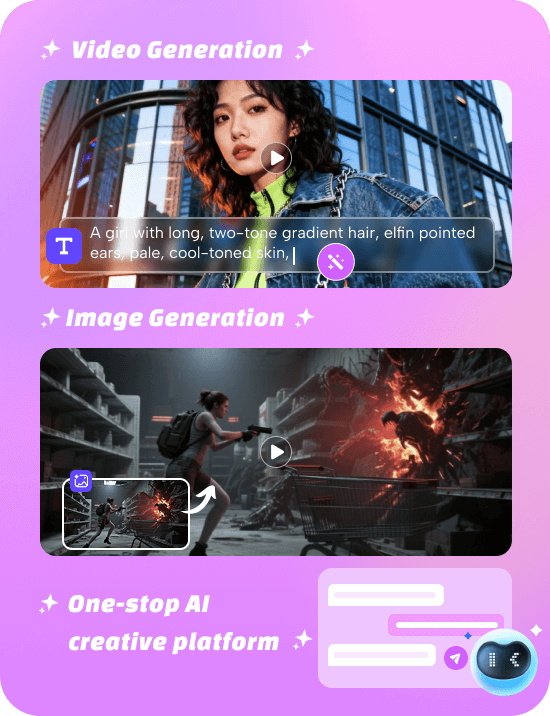
After testing dozens of tools, I found that the easiest way to actually use Seedance 2.0 Prompts is through Novi AI. Instead of worrying about setup or model access, I can jump straight into creating videos using the Seedance 2.0 model built inside the platform.
What I like most is how smoothly Novi AI translates prompts into results. When I paste a well-structured prompt—especially ones with camera movement, lighting, and motion details—the output feels cinematic and consistent. It's not just about generating videos; it's about getting results that actually match what I imagined.
Why I Use Novi AI for Seedance 2.0
- Built-in Seedance 2.0 model – no extra configuration needed.
- Prompt-friendly interface – perfect for copy-paste or custom prompts.
- Fast generation speed – ideal for testing multiple prompt variations.
- Multimodal support – combine text with image references for better control.
- 80 free coins for new users – great for experimenting without risk.
 Trustpilot Rating 4.8
From my experience, Novi AI is especially useful when I'm iterating on prompts. I can quickly tweak small details—like changing "soft lighting" to "dramatic rim lighting" or adding a "slow dolly-in camera"—and immediately see the difference in output. This makes it one of the best environments to both use ready-made Seedance 2.0 Prompts and learn how to write better ones.
Of course, like any AI tool, the quality still depends on how good your prompt is. But that's exactly why combining a strong prompt library with a tool like Novi AI works so well—you get both speed and creative control.
Generated by Seedance 2.0 in Novi AI
FAQs About Seedance 2.0 Prompts
1How long should my Seedance 2.0 prompt be?
30-100 words is the sweet spot. In my testing,the best outputs came from prompts under 60 words plus constraints. Longer prompts often cause the AI to "forget" earlier instructions.
2What makes Seedance 2.0 different from other AI video generators?
Seedance 2.0 is the first to support quad-modal input (text, image, video, audio simultaneously). This means you can combine a reference image with audio cues and text description in a single generation.
3Why do my videos "drift" away from the prompt?
Usually because the AI locks onto a later instruction and forgets earlier ones. The model honors the earliest strong instruction. If your subject is wrong, editing the style section won't fix it—you need to fix the subject description.
4How do I maintain character consistency across multiple videos?
Use the `@character_id` tag to reference a specific character, then describe key identifying features (clothing, hair, accessories) that should stay constant. Avoid changing too many variables between shots.
5Can I use Seedance 2.0 for commercial projects?
Yes, but check the specific terms of whatever platform you're using to access Seedance 2.0. Most commercial use is permitted, such as Novi AI, but licensing varies by provider.
6What resolution and length can Seedance 2.0 produce?
Up to 1080p resolution and 4-15 seconds duration, depending on your settings and the platform you're using.
7How do I fix common artifacts like extra fingers or distorted faces?
Add specific negative prompts ("no extra fingers," "no deformed hands"). If problems persist, try adjusting your shot size—sometimes a wider shot reduces detail artifacts that appear in close-ups.
8Should I use detailed prompts or keep them simple?
Simple and structured beats detailed and vague. A 40-word prompt following the SACSC framework will outperform a 200-word creative description every time.
Final Thoughts
Mastering Seedance 2.0 prompts isn't about memorizing magic words. It's about understanding how the model processes instructions.
Put your subject first. Be specific about action. Lock your camera. Add style sparingly. Use constraints wisely.
Start with the ready-to-use prompts in this guide. Then build your own using the framework. Within a few hours of practice, you'll be generating videos that actually match your vision.
The best AI video creators aren't the ones with the fanciest vocabulary. They're the ones who understand structure.
Now you do too.

Try Seedance 2.0 AI Video Generator Now
Was this page helpful?

Article by
Aaron Smith